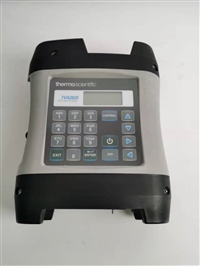
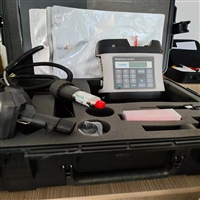


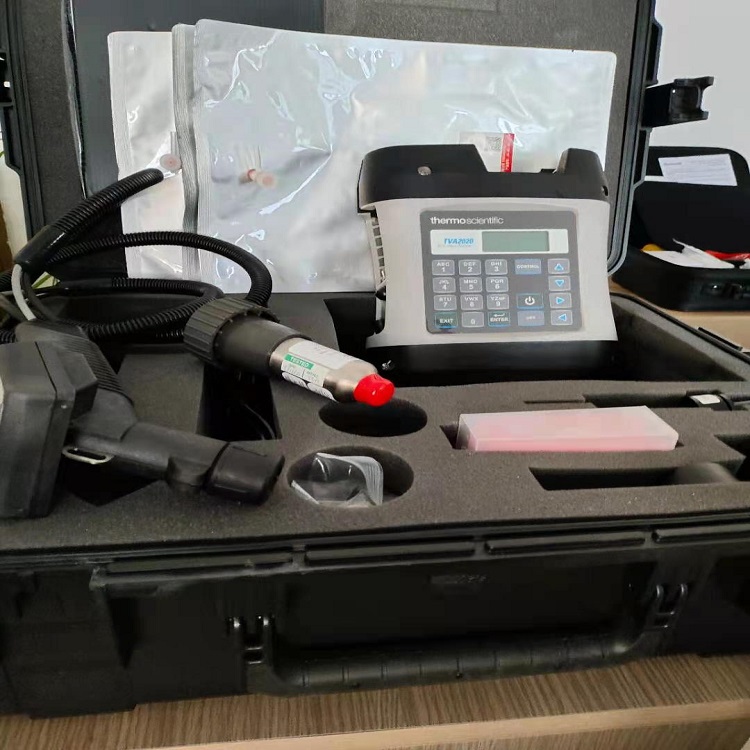
Toxic volatile gas analyzer Thermo Fisher TVA2020 dual detection
Category:
Instrumentation/Indoor environmental protection testing instruments/VOC detection instrument
Model:
TVA2020
Brand:
Thermo Fisher
model:
TVA2020
type:
handheld
measurement object:
VOC
measurement range:
1.0~30000ppm
measurement accuracy:
±0.1ppm
resolution:
±0.1ppm
power supply:
At 0 ℃, it can work continuously for at least 10 hours; The full charge time of the battery is less than 10 hours;
Processing & Customization:
yes
weight:
4.26kg
manufacturer:
Qingdao Road Expo
Retail Price
189,363.00USD
重量
kg
- Product Description
-
model TVA2020
type handheld
measurement object VOC
measurement range 1.0~30000ppm
measurement accuracy ±0.1ppm
resolution ±0.1ppm
power supply At 0 ℃, it can work continuously for at least 10 hours; The full charge time of the battery is less than 10 hours;
Processing & Customization yes
weight 4.26kg
manufacturer Qingdao Road Expo
Description :
How to operate and use the Thermo Fisher TVA2020 toxic volatile gas analyzer
TVA-2020C volatile toxic gas analyzer is an advanced, portable organic volatile gas monitoring instrument. This analyzer uses FID (flame ionization) detectors or FID detectors to measure the concentration of gases. The concentration value of the gas can be quickly read and displayed directly on the instrument panel. Gas can be displayed on two display screens in ppm, ppb, and percentage concentration (%).
2 Operation steps
2.1 Preparation before testing
Before going to the site, check the battery level of the analyzer and the pressure value of the hydrogen storage cylinder to check the operation.
2.2 Startup
Press the power button on the keyboard for more than 2 seconds to turn on the instrument and enter the main menu. Display 1=Run, 2=Setup, 3=Info, 4=Memory, 5=Comm menus. The "control" button on the button is used to control the menu and turn on/off the sampling pump and FID ignition.
2.3 Shutdown
Press the "OFF" button for more than 2 seconds to turn off the instrument.
2.4 Instrument Installation
Install the hydrogen storage cylinder into the mounting hole above the instrument and tighten it counterclockwise. Loosen the probe nut of the extension sleeve, insert the plug into the extension sleeve nut, and tighten the probe nut. Install the data cable and gas delivery pipe of the extension sleeve onto the corresponding socket of the analyzer.
2.5 Instrument preheating and operation
Preheat the instrument for at least 20 minutes. Press the 1=Run button on the main menu interface. The instrument FID will start automatic ignition and measurement. If the FID ignition is normal, the F alarm after the concentration value in the FID column will be eliminated. If the F flashes, it indicates abnormal ignition and a Flame out warning will appear. If the ignition is abnormal, press the "EXIT" button to eliminate the alarm and return to the main menu. Press 1=Run again to ignite and run until the ignition is normal. Alternatively, if the ignition is abnormal, you can enter the control interface by pressing the "control" button on the instrument without returning to the main menu, and then press the 3=Ight button to ignite again.
2.6 Modification of System Time
Select the 2=setup key, 5=Other key in the main menu, enter the interface, press the 2=Date key to modify the date format to 2 digits per month/day/year, press the confirm key to modify the date, and then press the confirm key to save. Press the 3=Time key to modify the time format to hour/minute/second. The method of modifying the time is consistent with the method of modifying the date.
2.7 Setting Measurement Mode
Select the 2=setup key and 3=log key in the main menu to enter the measurement mode setting interface. The current measurement mode and single measurement time will be displayed on the second line. Option 2=Auto automatic recording. Enter the automatic recording interface to set a single measurement time, such as 10 seconds. Press the 1 and 0 keys in sequence, and then press the "confirm" key to save the settings. Select 3=VOC/FE, 2=FE to enter manual recording. Enter the manual recording interface and set the single measurement time in the same way as in manual recording mode. Press the "up" and "down" keys to switch between value, minimum value, and average value in measurement mode. Press the "confirm" key to save the settings.
2.8 Data Export
Select 4=Memory and 1=USB Mode in the main menu and wait for a while to enter the interface. Then plug the data cable into the instrument and connect it to the data adapter box. Connect the other end of the data adapter box to another data cable and plug it into the computer. First time connecting to a computer
The computer will automatically install drivers. After installing the drivers, there will be an additional disk on the computer. There will be several files inside. Copy the Log.exe file and open it to see the data inside.
Attention: Be sure to connect the data cable to the computer and instrument after this interface appears.
In addition, after exporting data, be sure to remove the data cable from the USB drive in the bottom right corner of the computer. Not following the above steps can easily damage or even damage the instrument.
2.9 Instrument Calibration
2.9.1 Zero point calibration
Press 2=Setup and 1=Calib in the main menu to enter the calibration interface. Press 1=Zero on the coating thickness gauge to enter the calibration interface and calibrate the FID. At this time, introduce high-purity nitrogen and press the "confirm" button to start calibration. The analyzer is ignited and the sampling pump is turned on. After the FID reading stabilizes, press the "confirm" button to complete the calibration. Press 1=Yes to save the result and 2=Again to measure again.
2.9.2 Range calibration
Press 2=Setup and 1=Calib in the main menu to enter the calibration interface. Press 2=Span to enter the range calibration interface and press the "confirm" button to confirm whether the concentration of the standard gas is consistent with the existing concentration. If they are not consistent, you can press 6=Cfg in the calibration interface to change the methane standard gas concentration number and concentration. Press the "Confirm" button to start calibration. At this time, turn on the sampling pump of the analyzer and wait for the FID reading to stabilize before pressing the "Confirm" button to complete the calibration. Press the 1=Yes button to save the results and the 2=Again button to measure again for the ultrasonic flaw detector. During calibration, you can return to the operating interface to observe the response value after calibration.
4 Maintenance and Precautions
The analyzer should be stored in a cool, dry, and well ventilated place when not in use for a long time, and there should be no corrosive gases in the indoor air. And charge and discharge once every three months.
When the power of the analyzer is low, it should be charged in a timely manner.
During the transportation of instruments, they should be protected from rain and strong impacts.


instrument parameters
Technical parameters of Thermo Fisher TVA2020 toxic volatile gas analyzer in the United States:
Accuracy:
FID ranges from 1.0 to 10000ppm, with a reading of ± 10% or ± 0.1ppm, whichever is higher
PID ranges from 0.5 to 500ppm, with a reading of ± 20% or ± 0.5ppm, whichever is higher
Repeatability:
When FID is 500ppm methane, 2%
When PID 100ppm isobutene, 1%
Linear range:
FID 1.0~30000ppm methane
PID 0.5-2000ppm isobutene
Response time:
500 ppm isobutene is introduced into PID, and the time to reach 90% of the final value is less than 3.5 seconds
FID introduces 10000ppm methane, and the time to reach 90% of the final value is less than 3.5s
Sampling traffic:
At the entrance of the sampling probe, it is generally 1L/min
battery
At 0 ℃, it can work continuously for at least 10 hours; The full charge time of the battery is less than 10 hours;
Working time of hydrogen cylinder:
Starting from a gas cylinder pressure of 15.3Mpa (2200Psi) and working continuously for more than 10 hours
Weight:
Single FID detector 4.17kg
Dual detector 4.26kg
Working environment temperature:
-10℃~+45℃
Very low detection limit:
Very low detection limit calculated with a standard deviation of seven times the peak to peak noise
PID 0.5ppm isobutene
FID 0.5ppm methane
life:
PID regular cleaning, over 2000 hours
FID exceeds 5000 hours
Data storage interval:
Automatic mode 1 time/second or 1 time/999 minutes, user selectable
VOC or FE mode, 2-30 seconds, user selectable
Relative humidity at work:
15%~95%
AfterSalesService :
Key words:- Toxic volatile gas analyzer
More Products